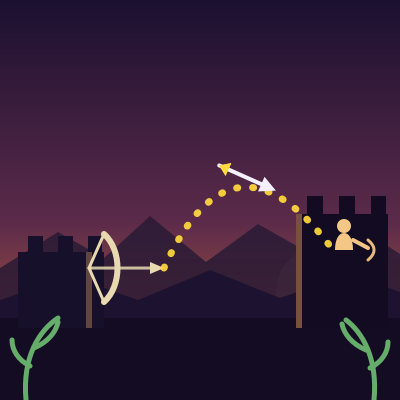
Playing: Brackenquiver
Is Brackenquiver not loading or not working? Please report it to us and we'll fix it as soon as possible.
About Brackenquiver
Brackenquiver is a siege archery game fought between two bastions. You have a bow and a small quiver, and the wall opposite you fills up with enemy archers as the waves go on. The first wave is a single archer standing on the tower roof. The second adds one more on the wall beside it. The third puts one on the roof and two flanking the tower, and by the fifth there are five of them spread along the battlements. Every archer walks up and down its own stretch of stone and reloads on its own count, so a crowded wall fires as a spread-out group rather than a single synchronised volley. Hold anywhere on the screen to draw the string - the dotted arc shows where the arrow will actually land, and it moves as your target changes height, so you have to keep adjusting instead of aiming once and hoping. Release to loose. Your arrows are unlimited, so the pressure comes entirely from the clock: a miss costs you the time it took to draw again, and every second you spend lining up is a second the enemy archers and runners are using. While you are aiming, the enemy archers shoot back on their own, and those arrows only ever reach the gate behind you, so the damage lands on your wall rather than on the archer you are trying to kill. Infantry also runs in from the right, and later waves send them in pairs rather than one at a time. Once a runner touches the gate it costs you a hit, so a runner has to be dropped in the field first. Your gate takes five hits. Clear every archer off the wall and empty the field to move on, and each wave brings a tougher opponent: more archers, quicker shots, less spread, and runners who arrive sooner. There are five waves, then the ridge is yours. The sound is generated in the browser rather than loaded from files, and the Sound button in the top bar mutes it and remembers the choice for next time. It works with a finger on a phone or a mouse on a desktop.
#shooting#exclusive#html5#archery#shooting#physics
Key Features
- Hold anywhere to draw the bow and release to loose, with a dotted arc that previews the flight
- Real projectile physics, so height, angle and power all change where the arrow lands
- Enemy archers who fill the wall one by one, each with their own walk cycle and their own reload, so they never fire in lockstep
- Melee runners that cross the field and cost you a hit if they reach the gate, arriving in pairs from the third wave on
- Five waves that add arrows but bring more archers, faster shots, tighter aim and earlier runners
- Five-hit gate, score for every archer and runner, and generated sound with a mute button
- Plays with a finger on a phone or a mouse on a desktop, and pauses when you switch away from the tab
Tips & Strategies
- Hold to draw, and keep watching the dotted arc while you hold. Every enemy archer walks up and down their own stretch of wall the whole time, so an arc that was lined up a second ago is no longer lined up now.
- You have unlimited arrows, so a miss costs you time rather than a resource. It is still worth waiting for a moment when your target is near a stop in their walk instead of firing at the top of the movement.
- Rushers do not stop at your wall, they cost you a hit the moment they reach the gate. If one is already past the halfway line, it is usually cheaper to take it down in the field than to let it arrive.
- There is no penalty for waiting. Enemies only shoot on their own timers, so standing still and letting them come to you costs you nothing except the runners you have to watch for.
- Do not hoard arrows for the last runner. Clearing the field is part of finishing the wave, and a wave with archers still alive can go badly if you spend the quiver on infantry instead.
- Watch which way your target is travelling, not just where they are. An arrow aimed slightly ahead of a moving archer lands where they are going instead of where they were.
- Later waves send runners in pairs instead of one at a time. Take the nearest one first, because a second runner crossing behind it is much easier to miss while you are reloading.
Frequently Asked Questions
How do I shoot?
Press and hold anywhere on the screen. The bow draws back and a dotted arc appears showing the path your arrow will take. Keep holding to build more power, adjust the angle by moving your finger, and let go to loose. Release early for a flatter, faster shot or hold longer for a heavier one that drops more steeply.
What do I have to do to win a wave?
Two things. You have to shoot every archer off the enemy wall, and you have to stop every runner before it reaches your gate. The wave only ends when the last archer is down and the field is clear, so a runner still walking when you finish the archers will keep the round going.
Do the arrows ever run out?
No, the quiver is unlimited and you can always draw and loose. What a miss costs you is time, and the enemy archers and runners are spending that same time on you. Firing at the top of an archer's walk cycle over and over will put arrows in the stonework while the gate chips away behind you.
How do the runners work?
They spawn at the enemy tower and walk left across the field. Any arrow that passes through one takes it down, and there is no need to aim for a head or a weak point. If a runner reaches your gate it costs you one of your five hits, which is why shooting one down early is nearly always better than letting it arrive.
Why do the archers move up and down?
To stop you aiming once and firing on a saved angle. Each archer travels up and down its own stretch of wall continuously, and they are on separate timings, so the height you need keeps changing and one saved angle will never fit. The dotted arc is there to help you read it.
Can I pause the game?
Yes. The Pause button in the top bar stops everything, including the archers and the runners, and shows a resume screen. The game also pauses on its own if you switch away from the tab, so you will not come back to a gate that fell while you were looking at something else.
Does Brackenquiver have sound?
Yes, and you can turn it off. Drawing the bow, loosing, hitting a runner and dropping the archer each have their own sound, with a short run of notes when you clear a wave. The sound is generated in the browser rather than loaded from audio files, which keeps the page quick to load. Use the Sound button in the top bar to mute it, and the game remembers your choice for next time.
Does it work on a phone and a tablet?
Yes. The page scales to the screen and the field of battle is kept in proportion, so the archer stays visible on a small display. The game responds to touch and mouse in the same way, and the buttons are large enough to hit with a thumb.
Comments …
Have something to say about this game? Drop a comment below.
Loading comments…
You Might Also Like
Nebula Grinder
0 plays▶ Play Now
Nebula Grinder
Clicker4.8
Astro Sabotage
0 plays▶ Play Now
Astro Sabotage
Arcade4.9
Nano Serpent
0 plays▶ Play Now
Nano Serpent
Arcade4.8

Underground Sprint
0 plays▶ Play Now
Underground Sprint
Arcade4.7
Aphelion Assault
0 plays▶ Play Now
Aphelion Assault
Shooting4.9
Nova Corsair
0 plays▶ Play Now
Nova Corsair
Arcade4.8
Clash of Orbs
0 plays▶ Play Now
Clash of Orbs
Hypercasual4.8
Nebula Bastion
0 plays▶ Play Now
Nebula Bastion
Action4.8