Playing: Mallowmoss
Is Mallowmoss not loading or not working? Please report it to us and we'll fix it as soon as possible.
About Mallowmoss
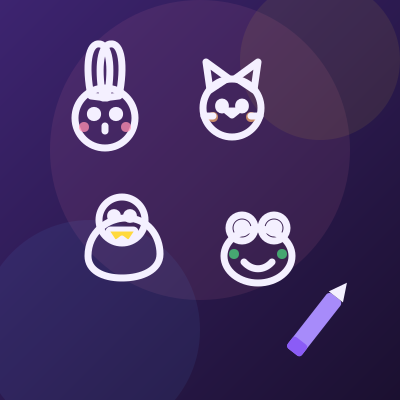
Mallowmoss is a colouring page you fill in by tapping, not a puzzle you can lose. Four original characters are waiting: Pip the Bunny, Miso the Kitten, Ducky the Duck and Bobo the Frog. Pick a colour, tap a part, and it fills in - the counter at the top keeps track of how much you have done, so nothing gets missed by accident. Every character is built from separate pieces, and a few of them sit away from the body, which is where most people get stuck. Pip's tail is tucked behind one hip, Ducky has a tuft on top of his head, and Bobo has spots across his back. Switch to the brush when you want to add your own stripes or doodles; brush strokes are decoration only and never count towards the percentage, so you cannot accidentally block yourself from finishing. The sound is generated live rather than loaded from files, and each fill plays a little higher than the last, so a finished page sounds like it climbed. Undo steps back one action at a time and Reset wipes the page, so there is no wrong way to play. It works with a finger on a phone or a mouse on a desktop, and there is no score to beat and no timer running down.
#girls#exclusive#html5#coloring#kids#drawing
Key Features
- Four original characters: Ducky the Duck, Bobo the Frog, Miso the Kitten and Pip the Bunny
- Tap-to-fill colouring with 16 colours and no fiddly lines to stay inside
- Brush mode for freehand stripes, spots and doodles of your own
- Progress counter that tracks every fillable part of the current picture
- Undo steps back one fill or one brush stroke, and Reset wipes the picture
- Generated sound effects, with each fill a note higher than the last
- Sound on or off toggle, remembered the next time you come back
- Plays with a finger on a phone or a mouse on a desktop, and runs offline
Tips & Strategies
- Fill the big shapes first. The head and body go down fast, and once the large areas are done the small details are much easier to see against a colour.
- Look for the parts that hide. Ducky has a tuft on top of his head, Bobo has spots across his back, and Pip's tail is tucked behind one hip. Those three are the usual reason the percentage stalls.
- Stick to one colour family per character. Two or three shades of the same colour tend to look better than six unrelated ones, and they make the outlines easier to read.
- Use the brush for texture rather than coverage. Thin stripes, freckles and spots look best, so keep the strokes light and away from edges you still want crisp.
- Pick a new colour from the swatch row at the bottom rather than starting over. Your work stays on the page until you press Reset, so changing your mind costs you nothing.
- Watch the percentage instead of the picture. When it reads 100% every fillable part has been coloured, including the ones you had forgotten were there.
Frequently Asked Questions
Is Mallowmoss free to play?
Yes. Mallowmoss is free, runs straight in your browser, and there is nothing to download, install or sign up for. Open the page and start colouring.
How do I fill in the pictures?
Tap a colour in the swatch row at the bottom, then tap any part of the character. That part fills in with the colour you picked. Tapping a part that already has your chosen colour does nothing, so you can keep tapping without making a mess.
What is the brush for, and does it count towards the percentage?
The brush is for decoration. It draws freehand lines so you can add stripes, spots or your own doodles, but brush strokes are never counted. That means you cannot accidentally colour over a part and lock yourself out of finishing the picture.
Can I undo a mistake?
Yes. Undo steps back one action at a time, whether that action was a fill or a brush stroke, so you can take a colour back off a single part. Reset is the bigger hammer: it clears the whole current picture and starts it fresh.
How many pictures are there?
Four, and they are ordered from the fewest parts to the most, so Next picture walks you from Ducky with nine parts up to Pip with fourteen. That way you can start with an easy one if you want, or sit with the most detailed one if you would rather.
Does Mallowmoss have sound?
Yes, and you can turn it off. Each fill plays a short note that is slightly higher than the one before it, so filling a picture sounds like climbing, and finishing plays a small four-note run. The tones are generated in the browser rather than loaded from audio files, which keeps the page quick and means they work without a connection. Use the Sound button in the top bar to mute it, and the game remembers your choice for next time.
Does it work on a phone and a tablet?
Yes. The page adapts to the screen and responds to both touch and mouse, so tapping with a finger on a phone and clicking on a desktop behave the same way. The palette and the buttons stay reachable at the bottom of the screen.
Comments …
Have something to say about this game? Drop a comment below.
Loading comments…
You Might Also Like

Style Salon
0 plays▶ Play Now
Style Salon
Girls4.8

Glam Swap
0 plays▶ Play Now
Glam Swap
Girls4.8
Nebula Grinder
0 plays▶ Play Now
Nebula Grinder
Clicker4.8
Shardlume
0 plays▶ Play Now
Shardlume
Bejeweled4.8
Emberwood Dash
0 plays▶ Play Now
Emberwood Dash
3D4.9
Veyra's Legacy
0 plays▶ Play Now
Veyra's Legacy
Adventure4.9
Astro Sabotage
0 plays▶ Play Now
Astro Sabotage
Arcade4.9
Nano Serpent
0 plays▶ Play Now
Nano Serpent
Arcade4.8